
Schema Markup for Roofers
Add structured data to a roofing website so Google reads the business facts without guessing and shows rich results such as star ratings and FAQ drop-downs in search.

Free Roofing Schema Audit
Most roofing sites run no structured data, or carry markup with validation errors. Get a free audit that lists missing types, broken properties, and the rich results your pages could earn.
What Is Schema Markup for a Roofing Site?
Schema markup is structured data, written as JSON-LD code, that labels a roofing site's business facts so Google reads them without guessing. It does not change the visible page; it speaks to the search engine in a format it parses directly.
A Shared Vocabulary
Schema.org provides the agreed types and properties, such as RoofingContractor and telephone, that Google and other engines recognize on sight.
Written as JSON-LD
The markup sits in a script tag as JSON. Google states a preference for JSON-LD over microdata because it stays separate from the visible HTML.
A Concept, Not the Code
This silo teaches the markup itself. The strategy of defining the business entity lives in the entity SEO silo.
Why Does Schema Markup Matter for Roofers?
Schema matters because it turns plain page text into facts Google can act on, which unlocks rich results that take more space and signal trust in the listing.
What Schema Unlocks
- Star ratings in the listing through Review and AggregateRating markup.
- FAQ drop-downs that expand under the result and answer objections in place.
- Clearer entity recognition, which feeds the Google Knowledge Graph.
The Click-Through Effect
- Star ratings can lift click-through on a roofing listing, with Google and industry sources reporting gains in a 20 to 35 percent range.
- A taller, richer listing pushes plain results down the page.
- Schema is a clarity signal, not a direct ranking factor, so treat gains as click-through and recognition.
How to Add LocalBusiness or RoofingContractor Markup
Place one LocalBusiness block on the homepage, using the RoofingContractor type, with the name, address, phone, hours, and geo coordinates. This anchors the business entity for the whole site.
The Required Properties
- @type: RoofingContractor, the schema.org subtype of LocalBusiness for roofers.
- name, telephone, url: the exact business name, phone, and homepage.
- address: a PostalAddress with street, city, region, and postal code.
- geo: GeoCoordinates that match the service location.
- Match these to your Google Business Profile exactly.
<script type="application/ld+json">
{
  "@context": "https://schema.org",
  "@type": "RoofingContractor",
  "@id": "https://example-roofing.com/#business",
  "name": "Example Roofing Co.",
  "image": "https://example-roofing.com/storefront.jpg",
  "telephone": "+1-555-0100",
  "priceRange": "$$",
  "address": {
    "@type": "PostalAddress",
    "streetAddress": "120 Industrial Way",
    "addressLocality": "Springfield",
    "addressRegion": "MO",
    "postalCode": "65801",
    "addressCountry": "US"
  },
  "geo": {
    "@type": "GeoCoordinates",
    "latitude": 37.2089,
    "longitude": -93.2923
  },
  "openingHours": "Mo-Fr 07:00-18:00",
  "url": "https://example-roofing.com/"
}
</script>
Paste into a single script tag in the homepage head, then validate in the Rich Results Test.
Turn Listings Into Phone Calls
A roofing page can rank yet show a plain blue link. We add and validate the structured data so your listing carries stars and answers, and earns the click.
Call Now For PricingOr call +1 272-207-3231
How to Mark Up a Roofing Service Page
Add a Service block to each service page, naming the serviceType, the provider, the areaServed, and a plain-language description. One distinct service per page keeps the markup clean.
One Service, One Page
- serviceType: the named service, such as Roof Replacement or Storm Damage Repair.
- provider: reference the business @id so the service ties back to the entity.
- areaServed: the city or county the page targets.
- A residential, commercial, emergency, and maintenance page each get their own Service markup.
<script type="application/ld+json">
{
  "@context": "https://schema.org",
  "@type": "Service",
  "serviceType": "Roof Replacement",
  "provider": {
    "@type": "RoofingContractor",
    "@id": "https://example-roofing.com/#business"
  },
  "areaServed": {
    "@type": "City",
    "name": "Springfield"
  },
  "description": "Full residential roof tear-off and replacement with architectural shingles and a 25-year workmanship warranty."
}
</script>
The provider @id points at the RoofingContractor block on the homepage.
How to Add Review and AggregateRating Markup
Add AggregateRating with a ratingValue and reviewCount, plus at least one Review, using numbers that match real customer feedback shown on the page. Google forbids fabricated ratings.
The Rules Google Enforces
- Ratings must reflect genuine reviews the page can display.
- Self-serving reviews written by the business do not qualify.
- The ratingValue, bestRating, and reviewCount must be real numbers.
- See Review markup and AggregateRating.
<script type="application/ld+json">
{
  "@context": "https://schema.org",
  "@type": "RoofingContractor",
  "name": "Example Roofing Co.",
  "aggregateRating": {
    "@type": "AggregateRating",
    "ratingValue": "4.8",
    "reviewCount": "127"
  },
  "review": {
    "@type": "Review",
    "reviewRating": {
      "@type": "Rating",
      "ratingValue": "5",
      "bestRating": "5"
    },
    "author": {
      "@type": "Person",
      "name": "Mike T."
    },
    "reviewBody": "Replaced our storm-damaged roof in two days. Clean site, fair price."
  }
}
</script>
Valid review markup is what renders the star line in a search listing.
How to Add FAQ and HowTo Markup
Use FAQPage markup for a question-and-answer block and HowTo markup for a step-by-step roofing guide, marking up only content that is visible on the page.
FAQPage Markup
- Each entry is a Question with an acceptedAnswer.
- Use real questions and answers shown on the page, not promotions.
- Google now limits FAQ rich results to certain site types, so eligibility varies. See FAQ markup.
HowTo Markup
- Fits a guide such as how to spot a roof leak, with ordered steps.
- Each step is a HowToStep with text and an optional image.
- Keep it to genuine instructional content. See HowTo markup.
<script type="application/ld+json">
{
  "@context": "https://schema.org",
  "@type": "FAQPage",
  "mainEntity": [{
    "@type": "Question",
    "name": "How long does a roof replacement take?",
    "acceptedAnswer": {
      "@type": "Answer",
      "text": "Most residential roof replacements take one to three days, depending on the size of the roof and the weather."
    }
  }]
}
</script>
The questions in the markup must match the questions a visitor can read on the page.
Which Other Markup Helps a Roofing Site?
Beyond the core types, ImageObject, Organization, and Author markup add depth to a roofing site's entity and media. Each describes a specific part of the page to the search engine.
ImageObject
Describes a job photo with its URL, caption, and dimensions, so Google can use it in image results. See ImageObject markup.
Organization
Identifies the company as a legal entity with a logo and brand, separate from the local storefront. See Organization markup.
Author
Marks the writer of a roofing guide as a Person, which supports content trust signals. See Author markup.
Rich Results Cost Less Than Ads
A star-rated organic listing earns clicks at no cost per visit, against 50 to 150 dollars for paid roofing leads. Add the schema once and keep the richer listing.
Call Now For PricingOr call +1 272-207-3231
Which Properties Strengthen Roofing Markup?
Three properties carry extra weight for roofers: areaServed for coverage, knowsAbout for expertise, and sameAs for entity links. Each adds a fact Google can verify.
The Three Properties
- areaServed: the cities and counties you cover, as City and AdministrativeArea entries. See areaServed.
- knowsAbout: the roofing topics the business has expertise in. See knowsAbout.
- sameAs: links to the company's profiles on other sites. See sameAs links.
<script type="application/ld+json">
{
  "@context": "https://schema.org",
  "@type": "RoofingContractor",
  "name": "Example Roofing Co.",
  "areaServed": [
    { "@type": "City", "name": "Springfield" },
    { "@type": "City", "name": "Nixa" },
    {
      "@type": "AdministrativeArea",
      "name": "Greene County"
    }
  ]
}
</script>
An areaServed array can list each City and the county as an AdministrativeArea.
How to Test and Validate Roofing Schema
Validate every page through Google's Rich Results Test and the Schema Markup Validator before and after it goes live. The tools flag missing properties and syntax errors that block rich results.
Rich Results Test
Paste the URL or code and the tool reports which rich result the page qualifies for, plus errors and warnings to fix.
Schema Markup Validator
Validator.schema.org checks the syntax against the full schema.org spec, beyond the subset Google supports.
Search Console Report
The Rich Results report tracks valid items, errors, and impressions over time. See technical SEO for roofers.
Common Roofing Schema Mistakes
Roofing sites lose rich results through six recurring schema mistakes, each fixable in the markup.
Data and Rule Errors
- Ratings that do not match real reviews, which violates Google's policy.
- A name, address, or phone that conflicts with the Google Business Profile.
- Markup for content that is not visible on the page, a structured-data spam risk.
Setup and Upkeep Errors
- Missing required properties, so the page never qualifies for the rich result.
- Duplicate or conflicting markup blocks on a single page.
- Markup left unvalidated, so a silent syntax error blocks every rich result.
How Does Schema Differ From Entity SEO?
Schema and entity SEO are different layers: entity SEO is the strategy of defining who the business is, and schema is the code that states those facts on the page.
Entity SEO Is the Concept
Entity SEO decides which facts to establish about the roofing company across the web, such as its identity, services, and area. The concept work lives in the entity SEO silo.
Schema Is the Markup
Schema takes those facts and writes them as JSON-LD that Google parses directly. This silo covers the markup and how to add it, one type at a time.
Proof of Performance
Results from roofing campaigns that rank in local search.
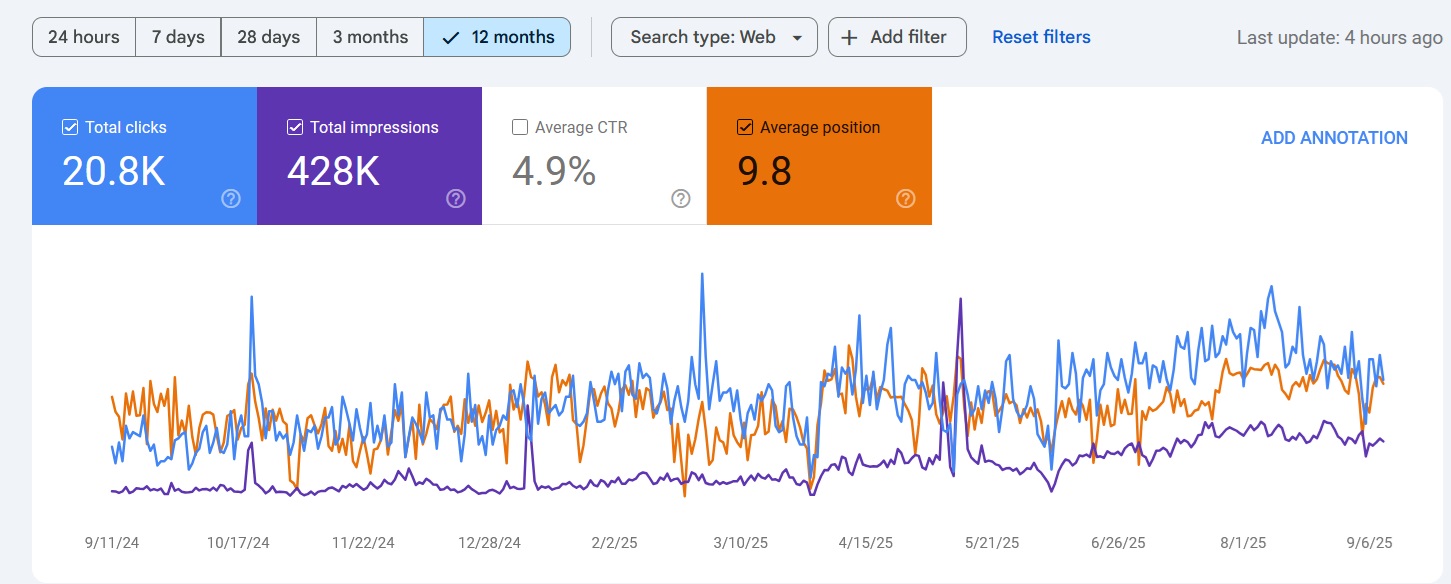
Map Pack Rankings
Ranked in Local Search Within 90 Days
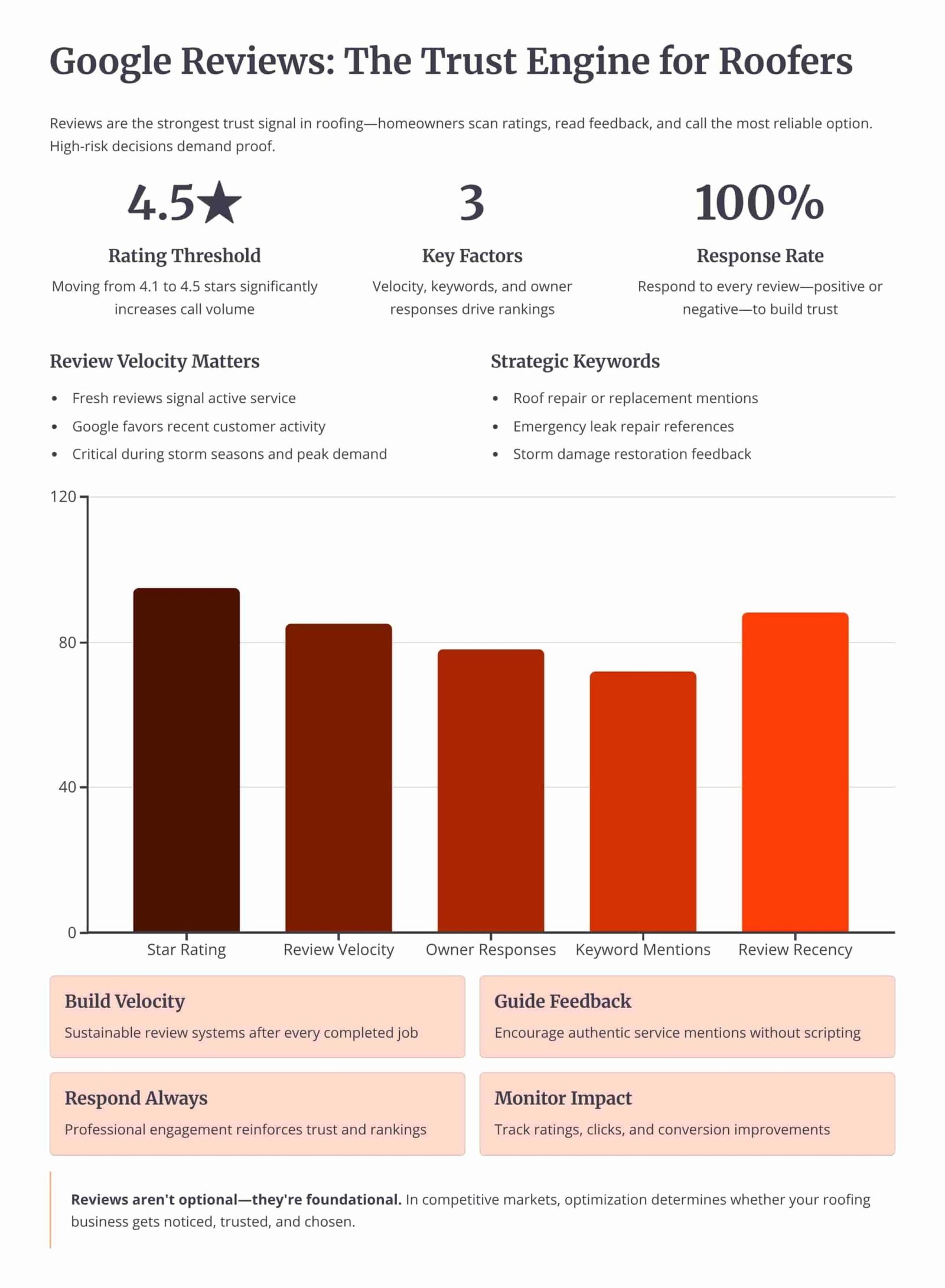
Review Velocity
150+ 5-Star Reviews Generated
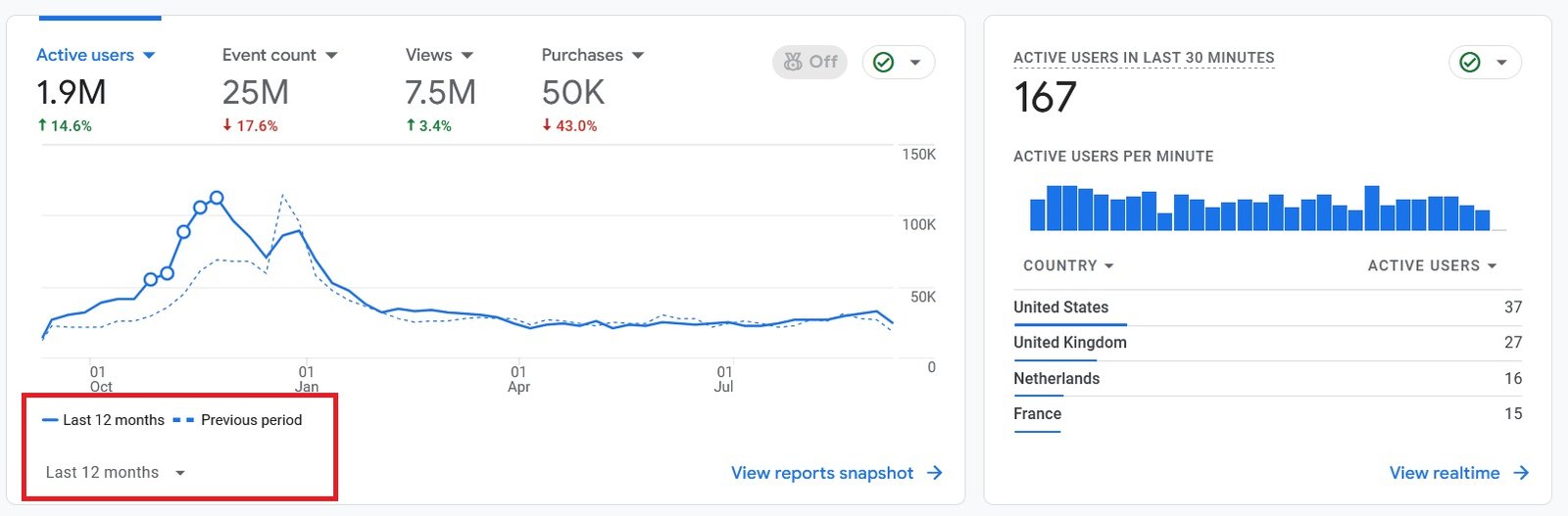
Organic Traffic
300% Increase in Qualified Traffic
What Roofers Say
The 180-Day Roofing SEO Roadmap
See how we optimize the profile, build the website, and earn local-pack rankings over a 6-month engagement.
Month 1: Profile Audit and Setup
- Category and Field Fixes: Setting the primary category, secondary categories, description, services, and service areas.
- NAP Cleanup: Correcting the name, address, and phone number across the profile, the website, and the directory citations.
Month 2: Reviews and Media
- Review System: Setting up a steady request flow and replying to every review, positive and negative.
- Photo and Post Cadence: Uploading job photos from each completed roof and publishing profile posts twice a month.
Month 4: Citations and Site Support
- Citation Building: Adding consistent listings on the directories that feed prominence for a service area.
- Service-Area Pages: Building city pages on the website that reinforce the profile's service areas.
Month 6: Local-Pack Rankings and Leads
- Map-Pack Position: Reaching the top 3 of the local pack for core roofing queries in the served cities.
- Lead Tracking: Measuring calls and direction requests from the profile against the cost of paid leads.
Owning Search Demand vs Renting It From Lead Platforms
If you pay Angi or Google Ads, you are renting visibility. The moment you stop paying, your pipeline dries up. Ranking the profile and the website for high-intent local searches builds permanent digital equity.
Shared Lead Platforms (Angi, HomeAdvisor)
- The Race to the Bottom: Shared leads force you to slash prices to win against 5 other roofers.
- Low Intent: Half the time they aren't ready to buy, they were just clicking around online.
Local Search SEO (Our Approach)
- 100% exclusive, direct-to-you inbound calls.
- Highest closing rate. They chose YOU from the local pack.
- Compounding ROI. You don't pay per click.
We Identify Search Intent Using Industry-Leading Data Tools



Expertise Built on Data.
Not Guesswork.
I'm Nizam Ud Deen, and I don't build generic websites. I build search intent engines specifically for the roofing industry.
For years, I've watched roofers burn money on agencies that brag about "traffic" while the phones stay silent. Traffic without intent is worthless. My system maps exactly how homeowners search during storms, when comparing prices, and when they're ready to buy, and intercepts them at every stage.
The No-Brainer Roofing SEO Guarantee
We don't guarantee "traffic" or "rankings." We guarantee high-intent leads.
"We guarantee to generate 15 exclusive, inbound replacement or repair leads per month within the first 180 days, driven entirely by high-intent organic search. If we don't hit that metric, we work for free until we do."
Measuring Success: Leads and Revenue
We don't report on vanity metrics. If traffic goes up but revenue stays flat, the strategy failed. We track the pipeline.
Call Tracking
Every keyword mapped to the exact phone call it generated.
Form Fills
Tracking estimate requests from high-intent local landing pages.
Booked Jobs
Connecting CRM data to SEO efforts to prove actual revenue return.
Cost per Lead
Monitoring organic CPL to ensure it beats shared platform costs.
The Roofing Schema Markup Checklist
Run each roofing page through this checklist to confirm the structured data is valid and eligible for rich results.
Frequently Asked Questions
Clear answers about schema markup and structured data for roofing pages.
What is schema markup for a roofing website?
Which schema type does a roofing site need first?
What format should roofing schema use, JSON-LD or microdata?
Where do I place the JSON-LD on the page?
<script type="application/ld+json"> tag, in the head or body. WordPress users add it through an SEO plugin field or a code block, so the markup ships with the page.How do I test roofing schema markup?
Does schema markup improve roofing rankings?
Can I add review stars to my roofing listing with schema?
What is the difference between schema markup and entity SEO?
How does FAQ schema help a roofing page?
Should every roofing page have the same schema?
Does my schema have to match my Google Business Profile?
What is the sameAs property used for?
Can schema cause a penalty for a roofing site?
What is rich results eligibility?
Get Your Free Roofing Schema Audit
We'll check the structured data across your roofing pages, list the missing types and validation errors, and show which rich results your listings could earn.
What You Get:
- Markup InventoryA list of which schema types each key page carries today, and which are missing.
- Validation ScanErrors and warnings from the Rich Results Test on your live pages.
More Deliverables
- Rich Result MapWhich listings could show stars, FAQ drop-downs, or other features.
- JSON-LD SamplesReady-to-paste markup blocks for your highest-value roofing pages.
Claim your free roofing schema audit today. No commitment required.