
Click-to-Call Buttons for Roofers
Place tap-to-call buttons on every roofing page so a homeowner on a phone reaches you in one tap, the moment a leak or storm sends them searching.
Free Click-to-Call Audit
Many roofing sites still print the phone number as plain text or hide it inside a logo image. Get a free audit of where your call buttons sit, whether they are tappable, and how to make every page reach you in one tap.
What Is a Click-to-Call Button?
A click-to-call button is a tappable element on a web page that dials your phone number directly, built on a tel: link so a mobile visitor reaches you in one tap. On a roofing site it removes the gap between a homeowner's intent and the call.
The tel: Link Underneath
The button wraps a tel: link, such as href="tel:+15551234567". A tap opens the phone dialer with the number filled in, so the homeowner only confirms the call.
A Button, Not Plain Text
A styled button with a phone icon reads as an action. A number printed as plain text or baked into a logo image does not invite the tap and is missed on a small screen.
The Lever, Not the Landing Page
The button is the conversion lever. The page it sits on is built separately. See on-page SEO for roofers for page construction.
Why Do Click-to-Call Buttons Matter for Roofers?
Click-to-call buttons matter because most roofing searches happen on a phone during an urgent problem, and the call is the fastest path from a visitor to a booked job.
Roofing Demand Is Urgent
- A leak or storm damage pushes a homeowner to call now, not to fill out a long form.
- Google reports that a majority of mobile users rely on tap-to-call to reach a business, a behavior that fits emergency roofing demand.
- A phone call lets you qualify the job and book the visit in one conversation.
Traffic Without a Call Is Wasted
- A ranking page that buries the number leaks the visitor it worked to earn.
- Top roofing sites convert in the range of 6 to 10 percent, against a 2 to 4 percent industry average, and a clear call path is part of that gap.
- The button turns existing rankings into calls without buying more traffic. See conversion optimization for roofers.
Where Should Click-to-Call Buttons Go on a Roofing Site?
Place the button in four locations: the header, the hero above the fold, a sticky mobile bar, and inside the content after each persuasive block. A homeowner should never have to hunt for the number.
Header and Hero
A button in the header stays present on every page, and one in the hero meets the visitor in the first screen before any scrolling begins.
Sticky Mobile Bar
A bar pinned to the bottom of the phone screen keeps the call one tap away while the homeowner scrolls through services, photos, and reviews.
After Each Proof Block
Repeat the button after the services list, the testimonials, and the FAQ. Each block answers a question, and the button catches the visitor the moment they are convinced.
Turn Mobile Visitors Into Phone Calls
A roofing page can rank and still lose the homeowner who could not find the number fast enough. We place tap-to-call buttons where they convert and wire the tracking so you see each call.
Call Now For PricingOr call +1 272-207-3231
How Do You Design a Click-to-Call Button That Gets Tapped?
Design the button with high contrast against its background, a tap target of at least 48 by 48 pixels, a phone icon, and action copy that names the next step. The look decides whether a thumb finds it.
Make It Visible and Tappable
- Use a color that stands out from the page, not one that blends into the header.
- Hold the tap target at 48 by 48 pixels or larger, the size Google lists for comfortable touch.
- Add a phone icon so the action reads at a glance, before the words are even scanned.
- Leave space around the button so an adjacent link is not tapped by mistake.
Write Copy That Names the Step
- "Call Now for a Free Inspection" tells the homeowner what happens after the tap.
- Action-oriented call copy can lift response over a generic "Contact Us", reported around a third higher in CTA testing.
- For the language of the button itself, see call to action optimization.
How Should the Sticky Mobile Call Bar Work?
Pin a call bar to the bottom of the phone screen so it stays in view through the whole scroll, sized for a thumb and clear of the content. It is the single highest-traffic spot for a roofing call button.
Build It for the Thumb
- Keep the bar fixed to the viewport bottom, within reach of the thumb that holds the phone.
- Show the word "Call" with the icon, so the action is named, not just symbolized.
- Add bottom padding to the page so the bar never covers the last lines of content.
Show It Only Where It Helps
Run the bar on mobile, where the dialer is one tap away, and consider hiding it on desktop, where a visitor reads the number and dials a separate phone. This is part of mobile UX optimization.
How Do You Track Calls From Click-to-Call Buttons?
Track the calls with dynamic number insertion, which swaps the displayed number by traffic source so each call ties back to its page and channel. Without tracking you cannot tell which button earns the work.
Attribute the Call to a Source
- Dynamic number insertion shows a tracking number that maps to the visitor's source.
- A tap on the button also fires an event, so taps appear alongside form fills in analytics.
- Source data shows whether organic search, the map listing, or an ad drove the call.
Keep the Displayed Number Consistent
Tracking numbers change behind the scenes, but the name, address, and phone shown to people and crawlers must stay consistent across the site and the map profile. For the local signal, see local SEO for roofers.
What Does the tel: Link Need to Work Everywhere?
Write the tel: link with the full number in international format and no spaces, so it dials correctly on any phone and is never trapped inside an image.
Format the Number Correctly
- Use href="tel:" with the country code, such as tel:+15551234567, and no spaces or dashes inside the href.
- Show the number to the reader in a friendly format, while the link holds the clean digits.
- Never place the number only inside a logo or banner image, where no phone can dial it.
Keep Page Load Fast
A button only converts if the page is on screen. Aim for a mobile load under a few seconds, since a homeowner in a hurry abandons a slow page before the button ever appears. Speed lives in technical SEO for roofers.
A Call Costs Less Than a Shared Lead
A call from your own ranking page costs nothing per visit, against 50 to 150 dollars for a shared roofing lead. Make the number tappable on every page and keep the call instead of buying it.
Call Now For PricingOr call +1 272-207-3231
How Does the Call Button Fit With Forms and Chat?
Lead with the call for urgent roofing work, and keep a form and a chat option for the homeowner who would rather type or who reaches the site after hours. The button is the primary path, not the only one.
Call for Urgent Jobs
An active leak or storm damage needs a voice and a fast visit, so the call button leads on emergency and repair pages.
Form for Planned Work
A homeowner planning a replacement may prefer to send details. Pair the button with a short form. See lead forms.
Chat After Hours
A chat widget catches the visitor who arrives when the office is closed. See live chat integration.
Common Click-to-Call Mistakes Roofers Make
Roofing sites lose calls through a short list of recurring click-to-call mistakes, each one fixable in the page settings.
Build and Link Errors
- A phone number printed as plain text, which a phone cannot dial in one tap.
- The number baked into a logo or banner image, where no tel: link exists.
- A tap target smaller than 48 pixels, which a thumb keeps missing.
Placement and Consistency Errors
- A call button hidden below the fold or buried in a footer.
- Different numbers on different pages, which breaks tracking and trust.
- No tracking at all, so no page can be credited with the calls it earns.
How Do You Test and Improve Call Buttons Over Time?
Improve the buttons by measuring tap rate, call volume by source, and call quality, then changing one variable at a time. The data shows which placement and copy earn the booked job.
The Metrics to Watch
- Tap rate on each button position, to find where the calls come from.
- Call volume by source, to credit the pages and channels that drive demand.
- Call duration and quality, since a short hang-up is not a real lead.
Change One Thing at a Time
Test a single variable, such as the button color or the call copy, and read the result before the next change. To see where visitors tap and stall, pair this with heatmaps.
Proof of Performance
Results from roofing campaigns that rank in local search.
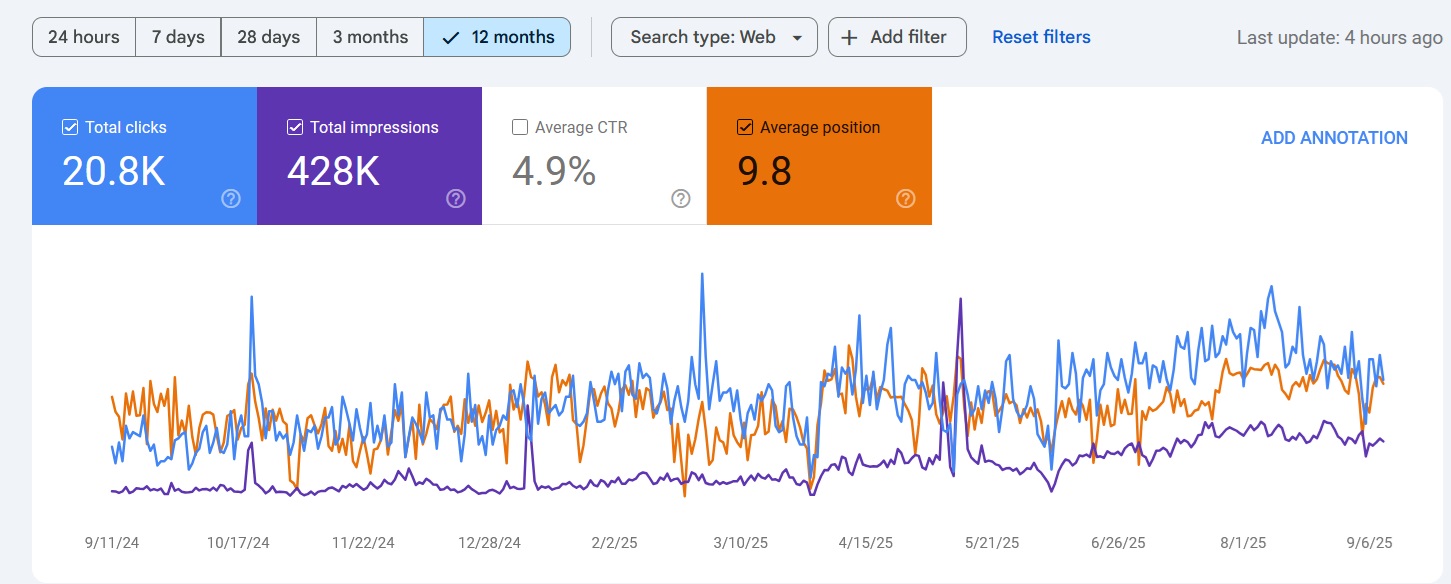
Map Pack Rankings
Ranked in Local Search Within 90 Days
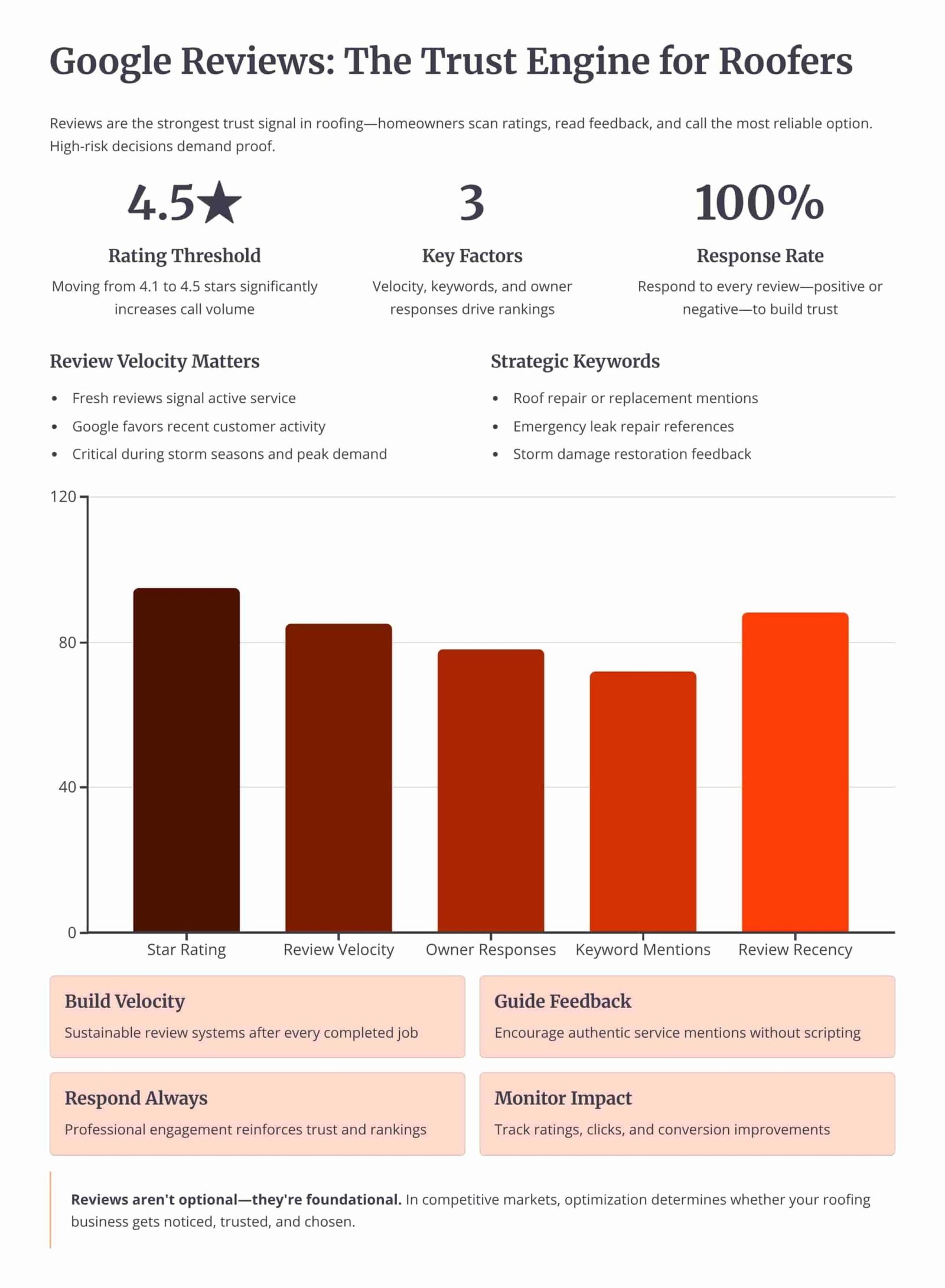
Review Velocity
150+ 5-Star Reviews Generated
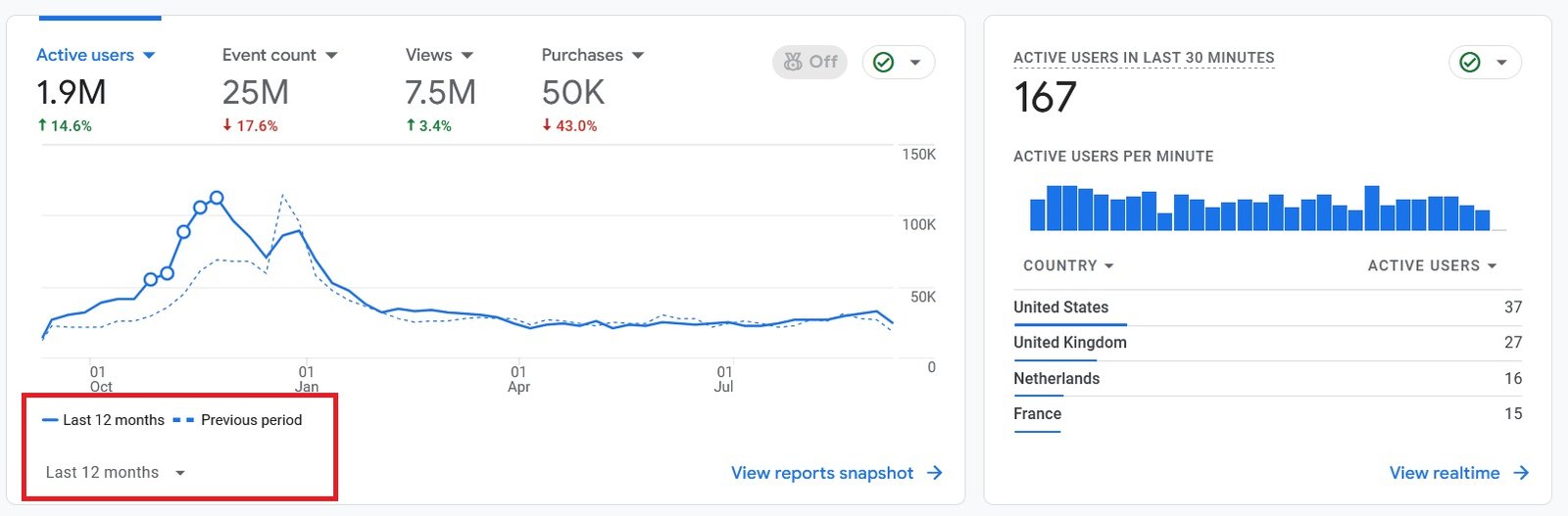
Organic Traffic
300% Increase in Qualified Traffic
What Roofers Say
The 180-Day Roofing SEO Roadmap
See how we optimize the profile, build the website, and earn local-pack rankings over a 6-month engagement.
Month 1: Profile Audit and Setup
- Category and Field Fixes: Setting the primary category, secondary categories, description, services, and service areas.
- NAP Cleanup: Correcting the name, address, and phone number across the profile, the website, and the directory citations.
Month 2: Reviews and Media
- Review System: Setting up a steady request flow and replying to every review, positive and negative.
- Photo and Post Cadence: Uploading job photos from each completed roof and publishing profile posts twice a month.
Month 4: Citations and Site Support
- Citation Building: Adding consistent listings on the directories that feed prominence for a service area.
- Service-Area Pages: Building city pages on the website that reinforce the profile's service areas.
Month 6: Local-Pack Rankings and Leads
- Map-Pack Position: Reaching the top 3 of the local pack for core roofing queries in the served cities.
- Lead Tracking: Measuring calls and direction requests from the profile against the cost of paid leads.
Owning Search Demand vs Renting It From Lead Platforms
If you pay Angi or Google Ads, you are renting visibility. The moment you stop paying, your pipeline dries up. Ranking the profile and the website for high-intent local searches builds permanent digital equity.
Shared Lead Platforms (Angi, HomeAdvisor)
- The Race to the Bottom: Shared leads force you to slash prices to win against 5 other roofers.
- Low Intent: Half the time they aren't ready to buy, they were just clicking around online.
Local Search SEO (Our Approach)
- 100% exclusive, direct-to-you inbound calls.
- Highest closing rate. They chose YOU from the local pack.
- Compounding ROI. You don't pay per click.
We Identify Search Intent Using Industry-Leading Data Tools



Expertise Built on Data.
Not Guesswork.
I'm Nizam Ud Deen, and I don't build generic websites. I build search intent engines specifically for the roofing industry.
For years, I've watched roofers burn money on agencies that brag about "traffic" while the phones stay silent. Traffic without intent is worthless. My system maps exactly how homeowners search during storms, when comparing prices, and when they're ready to buy, and intercepts them at every stage.
The No-Brainer Roofing SEO Guarantee
We don't guarantee "traffic" or "rankings." We guarantee high-intent leads.
"We guarantee to generate 15 exclusive, inbound replacement or repair leads per month within the first 180 days, driven entirely by high-intent organic search. If we don't hit that metric, we work for free until we do."
Measuring Success: Leads and Revenue
We don't report on vanity metrics. If traffic goes up but revenue stays flat, the strategy failed. We track the pipeline.
Call Tracking
Every keyword mapped to the exact phone call it generated.
Form Fills
Tracking estimate requests from high-intent local landing pages.
Booked Jobs
Connecting CRM data to SEO efforts to prove actual revenue return.
Cost per Lead
Monitoring organic CPL to ensure it beats shared platform costs.
The Roofing Click-to-Call Checklist
Run each roofing page through this checklist to confirm the call button reaches you in one tap.
Frequently Asked Questions
Clear answers about click-to-call buttons for roofing pages.
What is a click-to-call button?
How do I add a click-to-call button to a roofing site?
Where should a roofing call button be placed?
How big should a tap-to-call button be?
What should the call button say?
How do I write the tel: link correctly?
Should I use a sticky call bar on mobile?
How do I track calls from the button?
Does call tracking break NAP consistency?
Why is a plain text phone number a problem?
Should I show the call button on desktop too?
Should the call button replace my lead form?
How do I know if my call buttons are working?
Do click-to-call buttons help SEO directly?
Get Your Free Click-to-Call Audit
We'll review where your phone number sits on each roofing page, whether it is tappable, and how the call path compares to your top 3 local competitors to show where the visitor slips away.
What You Get:
- Button Placement ReviewA check of the header, hero, sticky bar, and in-content buttons on each key page.
- tel: Link ScanA list of pages where the number is plain text or trapped inside an image.
More Deliverables
- Tap Target CheckWhich buttons fall under the 48 pixel size a thumb needs on mobile.
- Tracking Setup PlanA plan to attribute each call to its page and source without breaking NAP.
Claim your free roofing click-to-call audit today. No commitment required.